The quickest way to add an SRT to a video on your computer is to give both files the same name and open the video in VLC. For a video you publish, upload the SRT to the platform, or burn the subtitles into the picture in an editor. Each method is described below, plus how to make the SRT file if you don't have one yet.

Soft subtitles or burned-in subtitles?
| Soft subtitles (separate file or track) | Burned-in subtitles (hardcoded) | |
|---|---|---|
| Turn on or off | Yes, viewers choose | No, always visible |
| Several languages | Yes, one file or track each | One per video |
| Fix a typo later | Edit the text file | Export the video again |
| Works everywhere | Only where the player supports subtitles | Yes — the text is part of the picture |
Use soft subtitles for players, YouTube and files you share; burn them in for social clips that play muted in feeds. This site creates and fixes the SRT file; burning it into the picture is done in a video editor or with FFmpeg.
Add an SRT file in VLC
- Put the subtitle file in the same folder as the video and give it the same name:
holiday.mp4andholiday.srt. VLC loads it automatically when you open the video. - Or, while the video plays, open the Subtitle menu and choose Add Subtitle File….
- Or drag the
.srtfile onto the VLC window.
If the subtitles are a bit early or late, VLC can delay them on the fly with the G and H keys, but only until you close the video. To fix the file itself, use the subtitle sync tool.
Upload subtitles to YouTube
- Open YouTube Studio and choose Subtitles in the left menu.
- Click the video and add the language if it is not listed yet.
- Choose Upload file; if YouTube asks, pick the option With timing — an SRT already contains the times.
- Select your
.srtfile and click Save.
YouTube Studio's labels change from time to time; the subtitle upload is always under Subtitles.
Import an SRT in Premiere Pro, DaVinci Resolve or CapCut
- Premiere Pro: in the Text panel, on the Captions tab, choose Import captions from file — or use File → Import and drag the caption item onto the timeline. Premiere creates a caption track you can style.
- DaVinci Resolve: on the Edit page choose File → Import → Subtitle, then drag the subtitle from the Media Pool to the start of the timeline. It lands on its own subtitle track.
- CapCut (desktop): open the Captions panel and import the
.srtfile from your computer. The phone app may not offer file import.
Editors can export the subtitles as a separate file or burn them into the picture when you render. Menu names differ between versions; if a step doesn't match, look for “import captions” or “import subtitle”.
Add subtitles with FFmpeg
FFmpeg is a free command-line tool. Put the video and the SRT in one folder, open a terminal there and run one of these.
Soft subtitles in an MP4 (no re-encoding, takes seconds):
ffmpeg -i video.mp4 -i subtitles.srt -c copy -c:s mov_text -metadata:s:s:0 language=eng output.mp4Soft subtitles in an MKV (MKV stores SRT as it is):
ffmpeg -i video.mp4 -i subtitles.srt -c copy output.mkvBurned-in subtitles (the video is re-encoded):
ffmpeg -i video.mp4 -vf subtitles=subtitles.srt -c:a copy output.mp4MP4 can't hold SRT directly, so -c:s mov_text converts the track to the MP4 subtitle format. The subtitles filter needs an FFmpeg build with libass (most downloads have it). To change the font, size or colour of burned-in text, convert the file to ASS, style it and burn the .ass instead.
No SRT file yet?
Paste your script or transcript into the converter below and download a timed SRT: each line becomes a subtitle, timed by reading speed or spread over your video length.
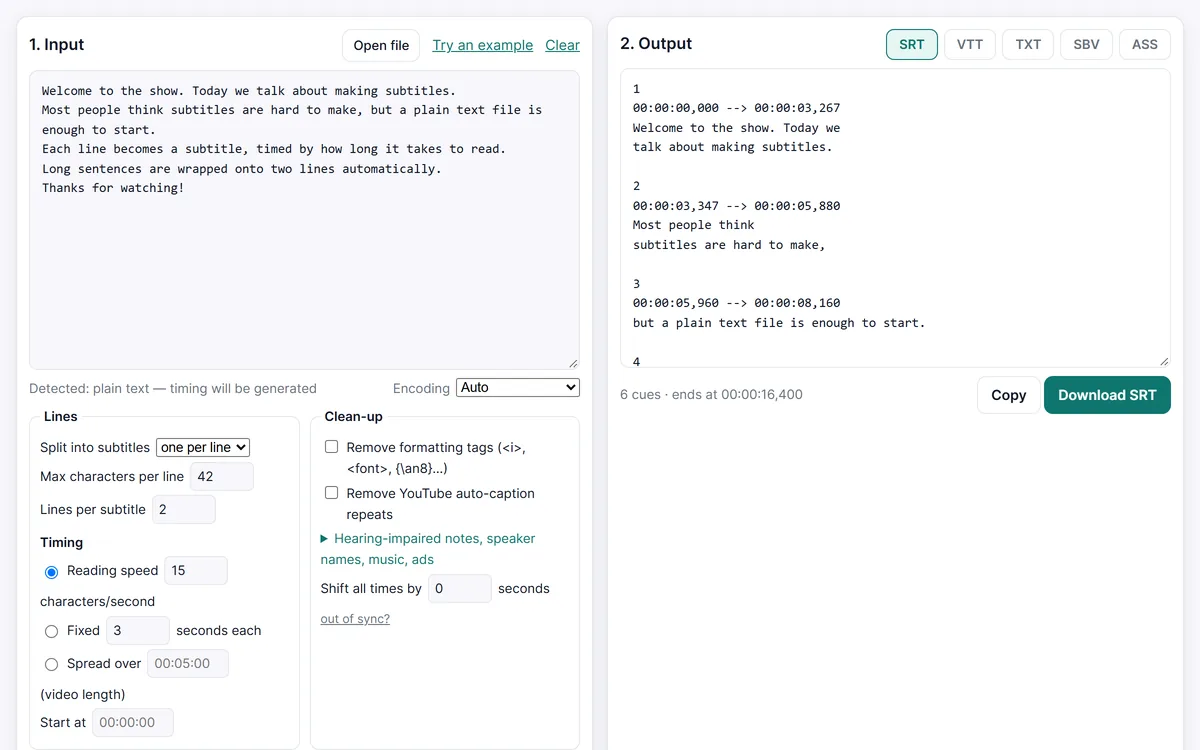
For timing that follows the voice exactly, use the SRT maker. Subtitles in another format? Convert VTT, SBV or ASS to SRT first.
Create the SRT file for your video
Frequently asked questions
Why doesn't VLC show my subtitles?
Check that the names match exactly (movie.mp4 / movie.srt) and that Windows didn't save the file as movie.srt.txt. Then make sure a track is selected in Subtitle → Sub Track.
Can I add subtitles to a video permanently?
Yes, by burning them in: export from your video editor with the captions burned in, or use the FFmpeg subtitles command above. This site makes the SRT file; it doesn't render video.
Which subtitle format does a web page need?
The HTML <video> element loads WebVTT, not SRT. Convert with SRT to VTT and add it with a <track> tag.
The subtitles are out of sync after adding them.
Shift all times or match one line to the video with the subtitle sync tool, then add the corrected file again.