SRT stands for SubRip Text, after the old SubRip program that wrote it. A .srt file contains no fonts, colours or video — only the words and the moments they appear and disappear. You can open one in Notepad, edit it by hand and load it in VLC, YouTube, Premiere Pro or DaVinci Resolve.

The structure of an SRT file
Here is a complete SRT file with three subtitles:
1
00:00:01,000 --> 00:00:03,500
Welcome to the show.

2
00:00:03,800 --> 00:00:06,200
Today we talk about
subtitle files.

3
00:00:06,600 --> 00:00:08,000
<i>Let's begin.</i>
Every subtitle (a “cue”) is a block of four parts:
- The number — 1, 2, 3… in order.
- The timecode — start time, the arrow
-->, end time, written ashours:minutes:seconds,milliseconds. - The text — one or two lines, shown exactly as written.
- A blank line — it ends the subtitle. The next block starts with the next number.
SRT format rules
- Comma before the milliseconds:
00:00:01,000, not00:00:01.000— the dot is WebVTT notation. - Two digits for hours, minutes and seconds, three for milliseconds; a space on each side of
-->. - End after start, and subtitles in time order. Overlapping times confuse some players and TVs.
- UTF-8 encoding for accents and non-Latin scripts. A byte order mark (BOM) helps some Windows players recognise it.
- About 42 characters per line, at most two lines. This is not part of the format but the usual guideline of streaming platforms: longer lines are hard to read in time.
- Reading time: roughly 1 to 7 seconds on screen per subtitle, depending on its length.
- Formatting:
<i>,<b>and<u>are widely supported;<font color>and position tags such as{\an8}(top of the screen) only in some players.
Common SRT errors and how to fix them
| What you see | Likely cause | Fix |
|---|---|---|
| The player can't find or open the file | It was saved as subtitles.srt.txt (Windows hides the .txt) | Turn on file name extensions in Explorer and rename it, or save with All files as the type |
é instead of é, or � | Wrong encoding | Save as UTF-8; for an old file pick its encoding when you open it here |
| Two subtitles shown as one, or some skipped | Missing blank line or a broken timecode | Add the blank line; check the arrow and the comma |
Tags like {\an8} appear as text | The player doesn't support them | Remove formatting tags |
| Every subtitle is early or late | Subtitles made for another version of the video | Shift them with the subtitle sync tool |
Quick repair: open a broken file in the converter below. It reads times with a dot or a comma, even when a blank line is missing, sorts the subtitles, shortens overlaps, numbers them from 1 and saves a clean UTF-8 .srt.
SRT vs VTT vs ASS
| SRT | WebVTT (.vtt) | ASS / SSA | |
|---|---|---|---|
| Time format | 00:00:01,000 | 00:00:01.000 | 0:00:01.00 |
| Styling | italic, bold, underline | CSS classes, positions | fonts, colours, outlines, positions, karaoke |
| Best for | players, editors, YouTube, TVs | HTML5 video and web players | styled subtitles, anime, burning in with FFmpeg |
| Convert | — | SRT to VTT · VTT to SRT | SRT to ASS · ASS to SRT |
How to make an SRT file in Notepad
- Open Notepad (on a Mac: TextEdit, then Format → Make Plain Text).
- Type the subtitles in the structure above: number, timecode, text, blank line.
- Choose File → Save as, set Save as type to All files, name the file
video-name.srtand pick UTF-8 as the encoding.
Typing timecodes by hand is slow and easy to get wrong. For more than a few lines, let the converter do it.
How to make an SRT file from text with this tool
- Paste your text into the box below, one subtitle per line, or click Open file to load a
.txt. - Choose the timing: Reading speed, a fixed number of seconds, or spread over your video length.
- Check the subtitles on the right and click Download SRT.
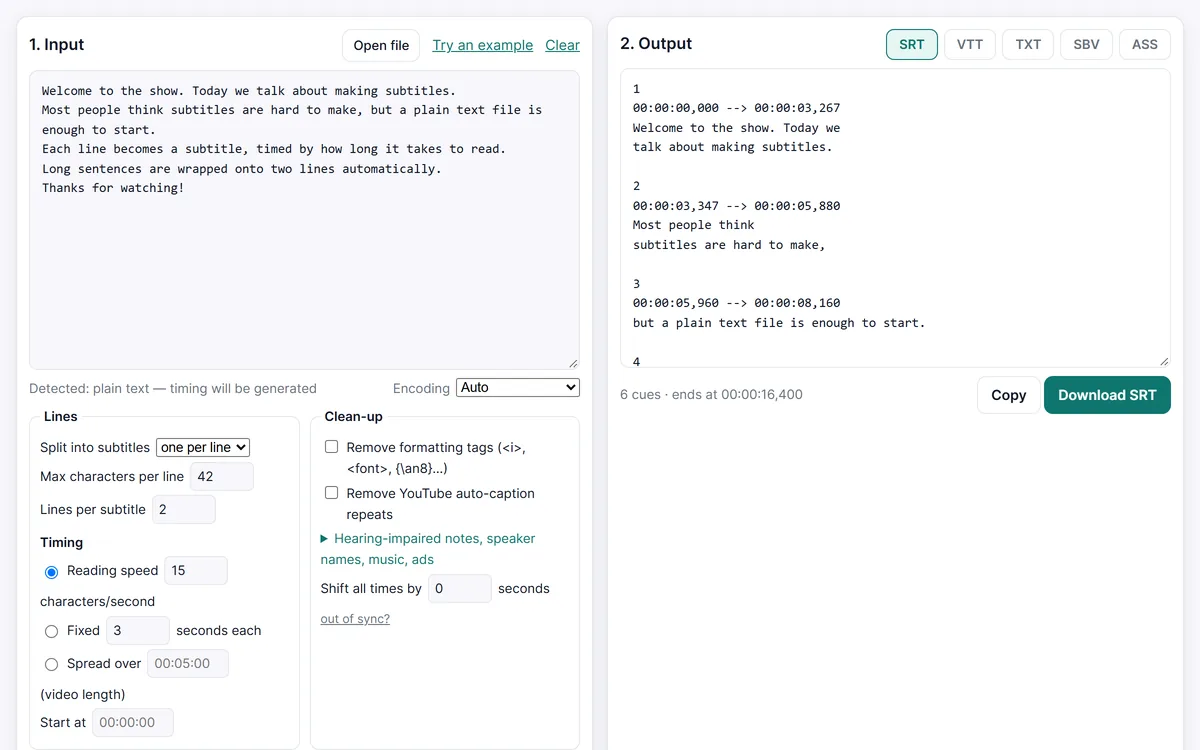
Long lines are wrapped at 42 characters and two lines per subtitle. When the subtitles must match the speech exactly, use the SRT maker and tap a key as each line starts.
Create an SRT file from your text
Frequently asked questions
Is an SRT file the same as a TXT file?
Both are plain text, but an SRT file has numbered, timed blocks. Renaming notes.txt to notes.srt adds no timing — convert the text with the TXT to SRT converter instead.
Which encoding should an SRT file use?
UTF-8. It handles every language. Files downloaded here are UTF-8 with a byte order mark, which Windows players detect reliably.
How long can a subtitle line be?
The format has no limit, but about 42 characters per line and two lines per subtitle is the common guideline. The converter wraps longer lines for you; both values can be changed.
Can an SRT file have colours or a position?
Only in a basic way: <font color> and {\an8} work in some players and are ignored or shown as text in others. For real styling convert to ASS.